The Drupal security checks EventHorizon adds: unescaped Twig, access, and queries, with file and line
A Drupal security audit checks the things the framework actually relies on: Twig autoescaping, the access API, query placeholders. EventHorizon runs those checks as static analysis, before a manual audit even starts.
The short version
- Drupal's security model lives in the framework: Twig autoescaping, the access API, query placeholders, permissions. General-purpose scanners read PHP well; EventHorizon adds the Drupal layer on top.
- EventHorizon checks for the Drupal-specific risks that matter: unescaped Twig and XSS, missing access and permission checks, insecure query construction, CSRF gaps, debug code in production, and exposed sensitive data.
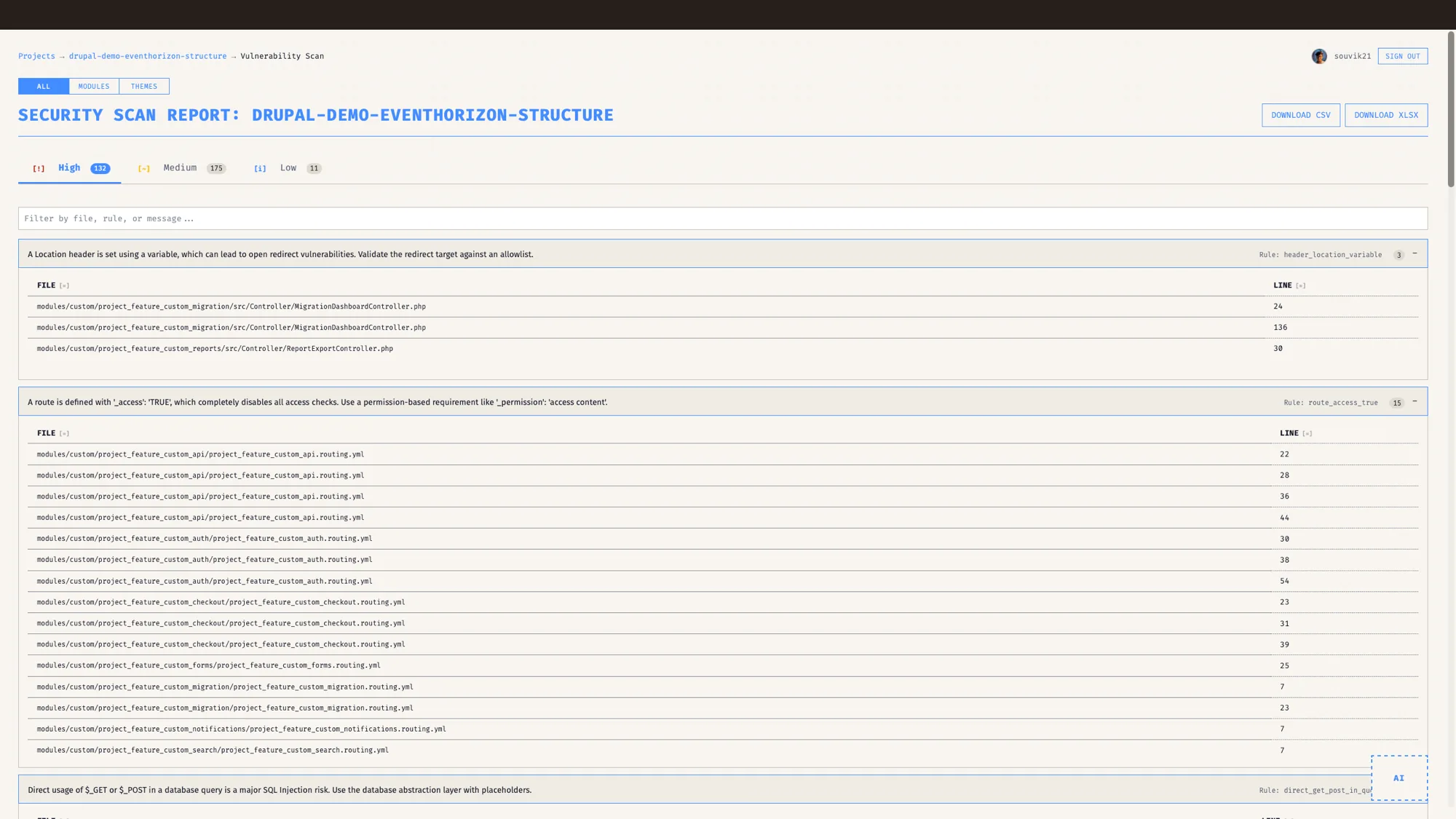
- Every finding carries a severity, a file, a line, and a plain explanation of the risk.
- It is static analysis, no AI required, and it is honest about its limits. It supplements a security audit. A manual audit still does the deep work.
- Built for Drupal 8 to 11.
The security findings that matter most are often the quiet ones. The obvious hole gets spotted in review. The one that costs you is the unescaped value that has been sitting in a custom template for a year, rendering fine, until the day someone pastes the wrong thing into a field and it runs.
I have sat in the meeting where an audit surfaces an issue like that in code nobody has touched since the last major release. It is an uncomfortable meeting. Everyone in the room is competent, the code passed review at the time, and the problem still slipped through, because catching it by eye means remembering one Drupal rule on every line across the whole codebase, forever.
Holding one rule across every line of an entire codebase, forever, is exactly the kind of work a Drupal-aware scanner is good at, and it frees people to focus on the judgement calls only they can make.
Where a Drupal-aware scanner adds to a general-purpose one
General-purpose scanners read PHP well. Most of Drupal's protections live a layer above the PHP, in the framework's own conventions, so a Drupal-aware scanner adds that layer on top.
Drupal autoescapes output in Twig, so the useful security question is "is this value being printed through Twig, or pushed out raw in a way that skips the escaping". Access control shows up as a route requirement, a permission, or an entity access check, the access API doing its job. Safe database queries use placeholders through Drupal's database layer. Reading those signals takes a tool that knows the framework, and that is the layer EventHorizon adds.
That Drupal knowledge also helps with signal. A tool that understands the framework can stay quiet where the framework already handles something, and speak up where it does not, so the findings you see tend to be the ones worth your attention. That is the value a Drupal-aware pass adds, and it is why the findings stay easy to trust.
What does EventHorizon look for?
EventHorizon's vulnerability scan is written around how Drupal actually defends itself. The two it catches most often are:
- Unescaped output and XSS, values reaching the page in ways that skip Twig's autoescaping.
- Missing access and permission checks, routes, controllers, and operations that should be gated and are not.
From there it also covers insecure query construction with hand-built SQL, CSRF gaps on state-changing actions, translation function misuse in t(), debug code left in production, and exposed sensitive data, among others.
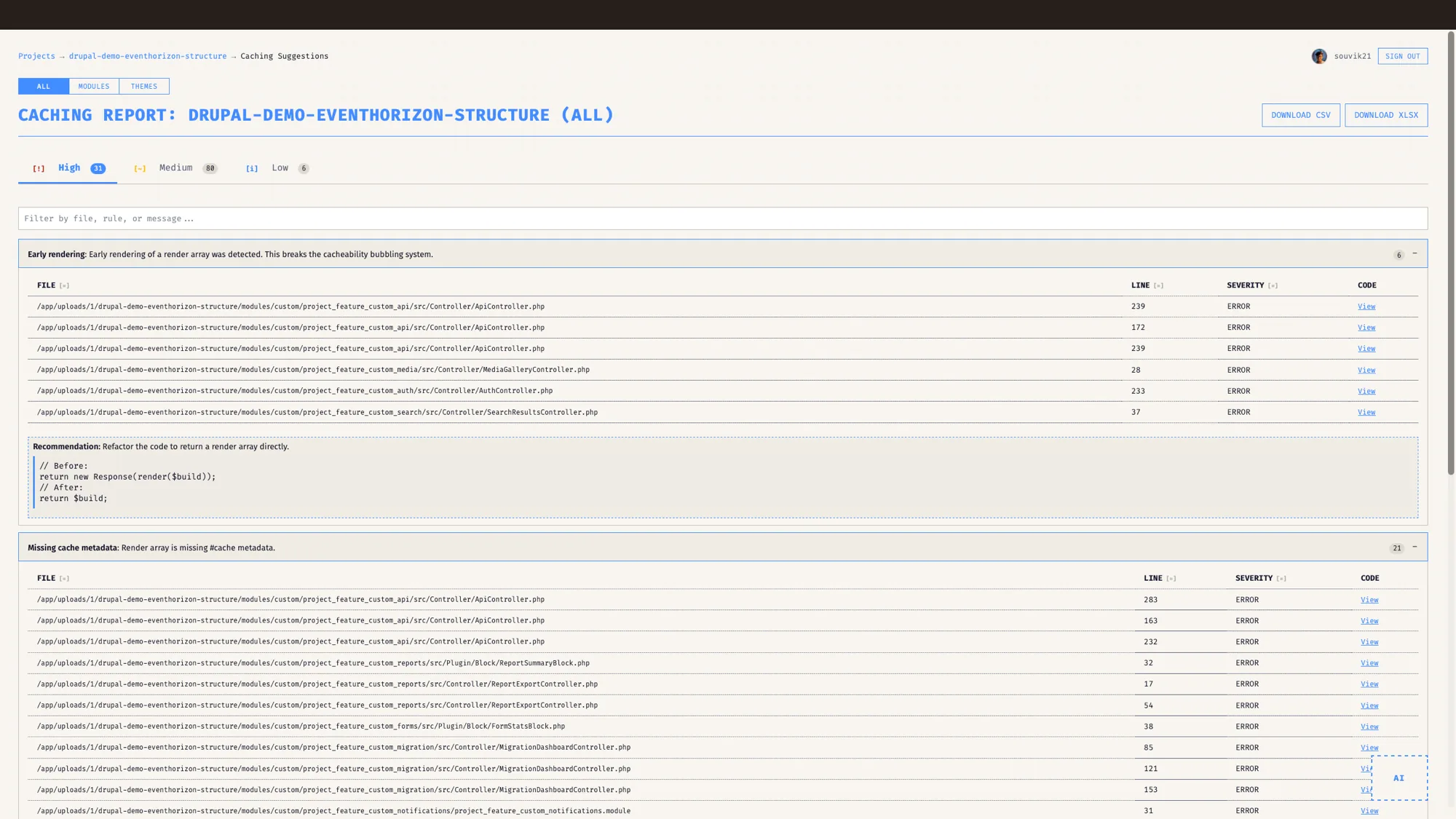
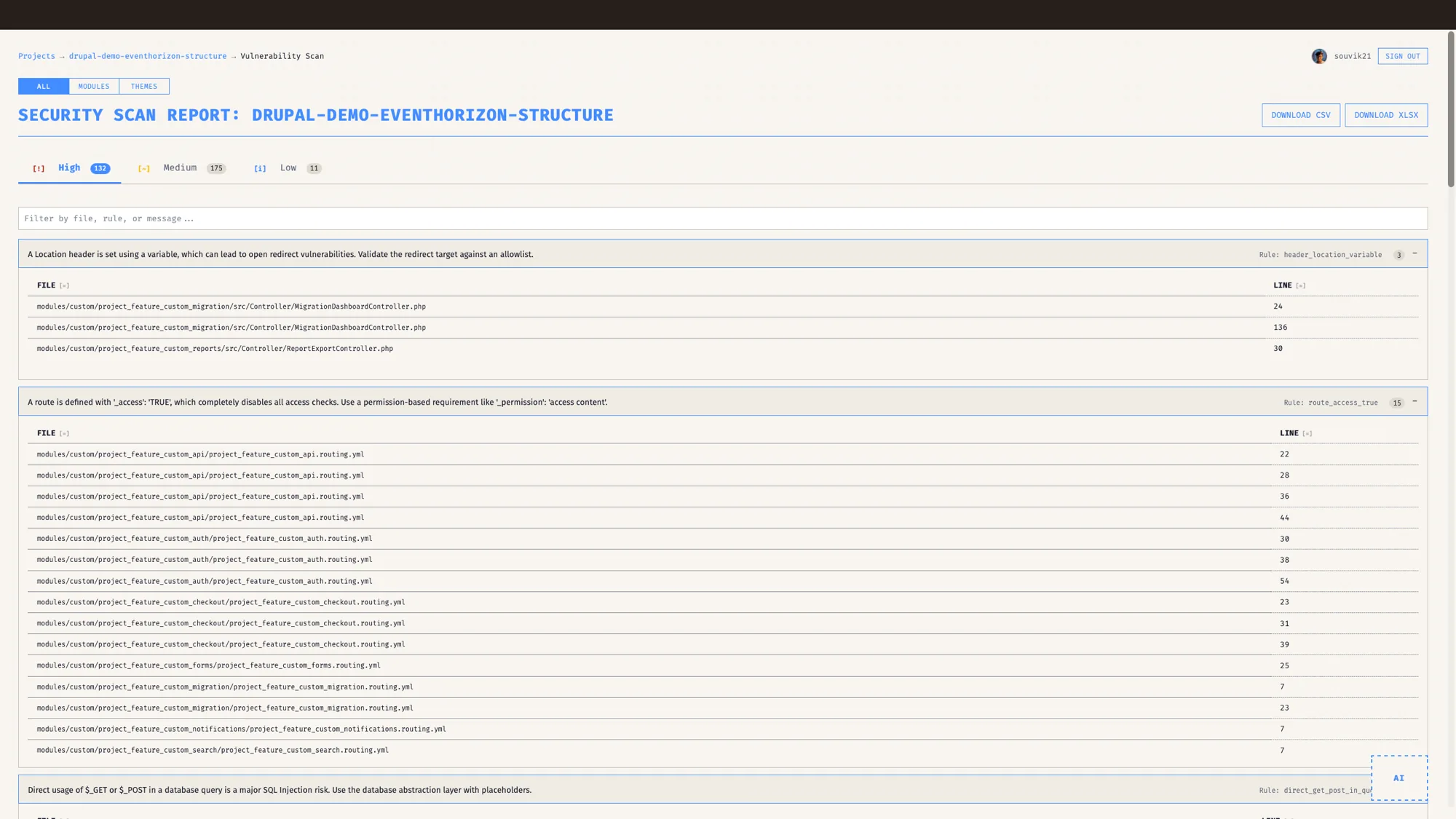
Each finding comes with a severity level, the exact file and line, and a clear explanation of why it is a risk. A sentence a developer can act on, written in plain words you can read at a glance. Every finding is tagged to the module or theme it actually lives in, so filtering by module keeps the list to module issues, and the CSV and XLSX exports match what you see on screen.
What does a real finding look like?
Picture a custom controller that takes a value from the request, looks something up, and returns it to the page. The logic is fine. The PHP is clean. The route is missing an access check, and the returned value goes out without escaping.
At the language level the syntax is valid, so this reads as ordinary PHP.
EventHorizon reads it as Drupal. It flags the route as missing an access requirement and points at the line. It flags the unescaped output and explains the XSS risk in terms of how Drupal would normally protect that value. Two findings, two severities, two locations, and enough context that the developer who picks up the ticket knows what to change and why.
What static analysis covers, and where a manual audit takes over
I want to be straight about this, because being honest about a security tool's scope is what makes it useful.
Static analysis catches pattern-based vulnerabilities. It is fast, it is repeatable, and it finds the recurring mistakes that hide in volume, the kind that are hard for any reviewer to hold across an entire codebase. The deeper work stays with a human: reasoning about your business logic, your authentication flows end to end, or a clever chain of conditions that only becomes a hole in combination. Static analysis covers the patterned ground well, and a manual audit takes over for the rest. A tool that is honest about that split tends to be the more useful one.
So use it as the layer it is. EventHorizon raises the floor. It clears the recurring, pattern-based issues quickly and cheaply, so that a manual audit, when you commission one, spends its expensive hours on the hard problems where that expertise counts. It supplements a security review. A manual audit still does the deep work.
Knowing the framework also helps EventHorizon keep the signal clean, and this is where a Drupal-aware tool adds value. When a finding matches a correct core idiom, \Drupal::database() used properly, a service injected through create(ContainerInterface) the way dependency injection is meant to work, EventHorizon lowers its confidence and tags it Verify with a plain reason, and keeps it in the list. Nothing silently disappears, so the report stays honest, and the real findings stay easy to spot.
A score your stakeholders can read
A list of findings tells a developer what to change. A single score tells the people who schedule the work whether it is urgent.
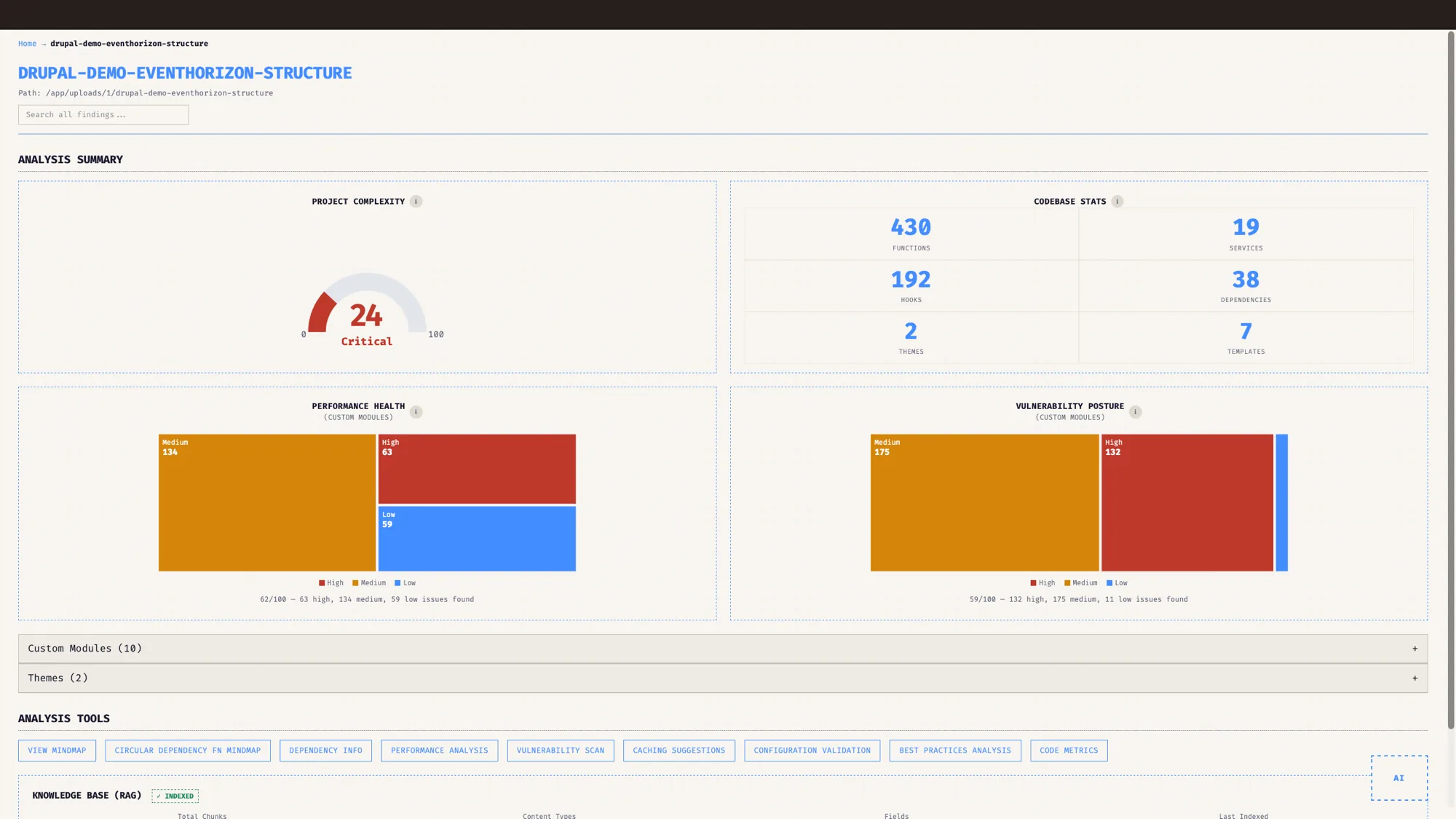
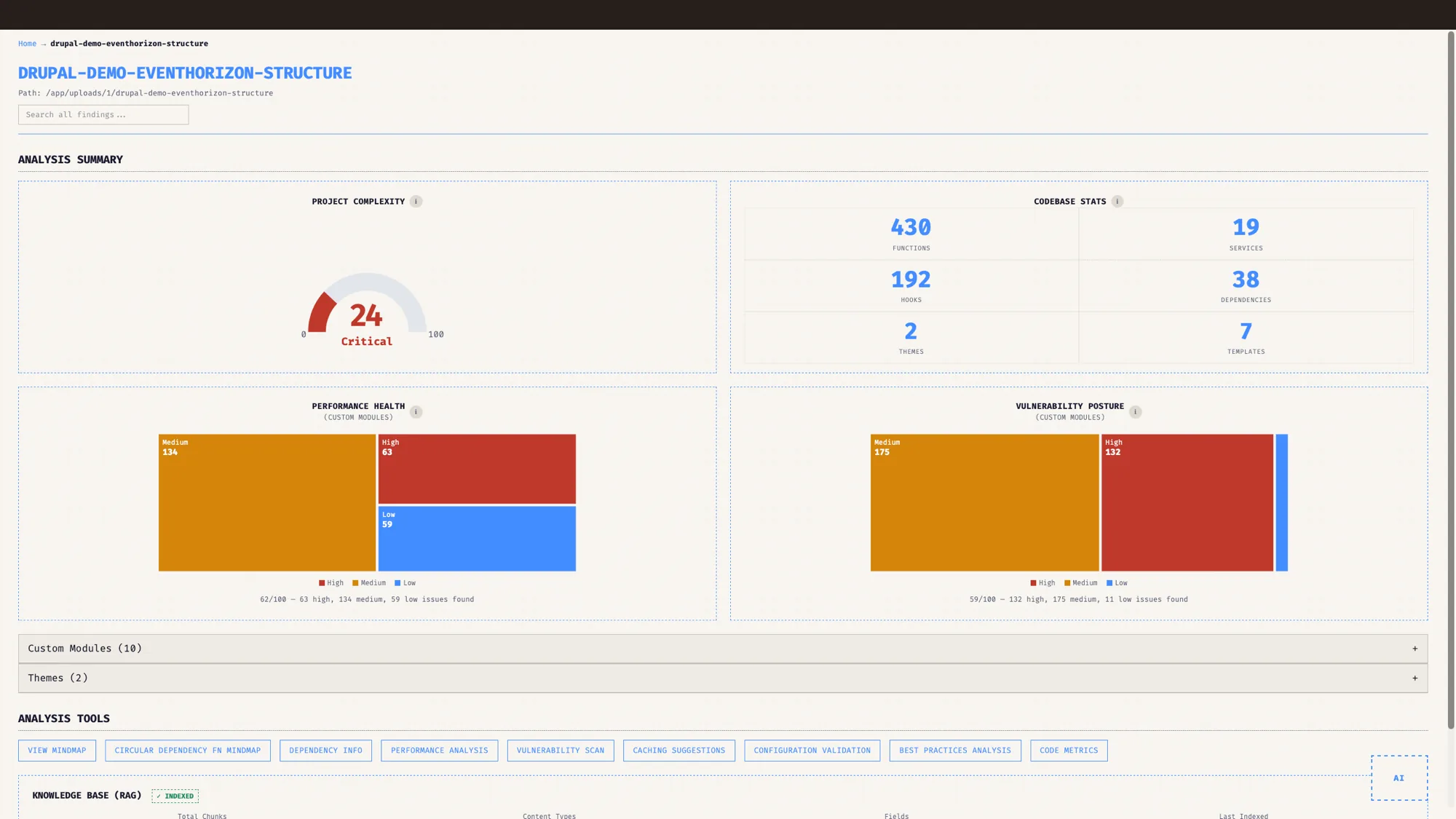
The security findings feed the Best Practices score, a 0 to 100 number, and EventHorizon draws a posture treemap so you can see which modules carry the risk. Security is the heaviest-weighted category in that score, sitting alongside performance, architecture, maintainability and the rest, and its number comes from threshold bands across the security checks, with raw findings rolled up into the band. You can hold it against an industry benchmark, sit it next to a short list of what is pulling it down, and a non-technical stakeholder understands the situation immediately. It gives a security conversation a clear number and a priority order to work from.
Who is this for?
For the developer, it is a list with a file, a line, and a reason, which is all anyone really wants from a security tool. For agencies, it is the fast first pass on a security audit, the part that used to eat a day of careful reading before you could even scope the real work. For enterprises and product teams, it is a repeatable check you can run on every release, so the quiet finding gets caught at commit time rather than a year later.
Writing the rules down, so they run every time
Security on Drupal has always rewarded the people who internalised the framework's rules and applied them carefully. Once a codebase grows past a few hundred files and a few sets of hands, writing those rules down so a tool can run them every time keeps that care consistent at scale.
EventHorizon does exactly that, running the checks on every pass, so the quiet finding gets caught early. It tends to make the recurring mistakes much easier to catch, and it lets the audit you commission spend its expensive hours where they count.
This post is part of the EventHorizon release series, alongside the pillar, Drupal native, not generic, and the companions on performance and cache tags, dependency maps and upgrades, and keeping your code private.
It is one strong layer in a wider security practice.
Frequently asked questions
What is a Drupal security audit?
A Drupal security audit checks the risks specific to Drupal, such as unescaped Twig output, missing access and permission checks, and insecure query construction. EventHorizon runs these as static analysis to supplement a manual audit, giving the audit a strong head start.
Does EventHorizon replace a security audit?
It works alongside one. EventHorizon catches pattern-based, recurring vulnerabilities quickly, which lets a manual audit focus its time on the harder problems. The two work best together.
What kinds of security issues does EventHorizon find?
Drupal-specific risks such as unescaped Twig output and XSS, missing access and permission checks, insecure query construction, CSRF gaps, debug code in production, and exposed sensitive data.
Does each finding tell me where the problem is?
Yes. Every finding includes the severity, the file, the line number, and a plain explanation of the risk.
Does the security scan send my code to an AI?
No. The vulnerability scan is static analysis. AI chat is a separate, optional feature you turn on with your own key.
Which Drupal versions does the security scan support?
Drupal 8, 9, 10, and 11. It now also flags APIs removed in newer releases, so you can see what breaks on current Drupal.
See it on your own Drupal codebase.
EventHorizon is launching soon, exclusively through QED42. Join the waitlist for early access.