The cache tag you forgot on line 247: catching Drupal performance bugs before production does
A Drupal performance audit usually comes down to one thing: caching. EventHorizon runs the Drupal-specific cache checks that turn a slow page into a fixed one, early, while it is still cheap to fix.
The short version
- Most Drupal performance bugs are caching mistakes. A profiler shows you which page is slow; EventHorizon adds the Drupal caching rule behind it.
- EventHorizon ships sixteen caching checks that understand Drupal's cache API: render cache, cache tags, cache contexts, BigPipe, cacheable metadata,
drupal_static, and more.- Every finding gives you the file, the line, the reason, and a fix written in Drupal's own terms.
- It runs as static analysis, no AI required, across both custom and contrib modules.
- Built for Drupal 8 to 11.
A page that should have rendered in under a second was taking four. No errors, no failing tests, nothing in the logs that looked wrong. The code had passed review. It had passed QA. It still brought the page to a crawl the moment real traffic hit it.
The cause was a single block that rebuilt itself on every request, because somebody had returned a render array without the cache metadata that tells Drupal it is safe to keep. One missing key. Hours of hunting. If you have run a Drupal site of any size, you already know this story, and you know it was never in the part of the code anyone thought to look at.
This is the post about finding that bug in seconds instead of an afternoon.
Why are Drupal performance bugs so hard to find by hand?
The honest reason is that the bug is usually invisible in the code itself.
A function that forgets its cache tags looks perfectly normal. It reads cleanly, it does what it says, and in local development with one user and no traffic it feels fast. The cost tends to show up under load, when Drupal rebuilds something on every request that it could have served from cache once and forgotten about.
Profilers are excellent at the job they do. They tell you which page is slow and which query ran a thousand times, which is the half of the picture they own. EventHorizon adds the other half: the Drupal caching rule behind it, like a #cache context that belongs on a render array or a cache tag that wants attaching to an entity load. Together they take you from the slow trace to the line that caused it.
That step, from "this is slow" to "here is the Drupal caching pattern to adjust", is exactly the step EventHorizon helps you make.
What does EventHorizon actually check?
The caching analysis is the part of EventHorizon I am most attached to, because it encodes the rules a senior Drupal engineer carries in their head and runs every one of them across every file at once.
It runs sixteen separate caching checks, each tuned to a real Drupal cache API pattern. The two that catch the most problems are:
- Render arrays with no cache metadata, the classic block or element that rebuilds on every single request.
- Missing cache contexts when the output depends on the current user, the kind that can serve one user's view to another.
From there it also covers missing cache tags on entity loads, cache contexts that vary by URL or route, BigPipe streaming opportunities, cacheable metadata that does not bubble up to its parent, uncached queries in a render path, and more, all named in the vocabulary your team already uses.
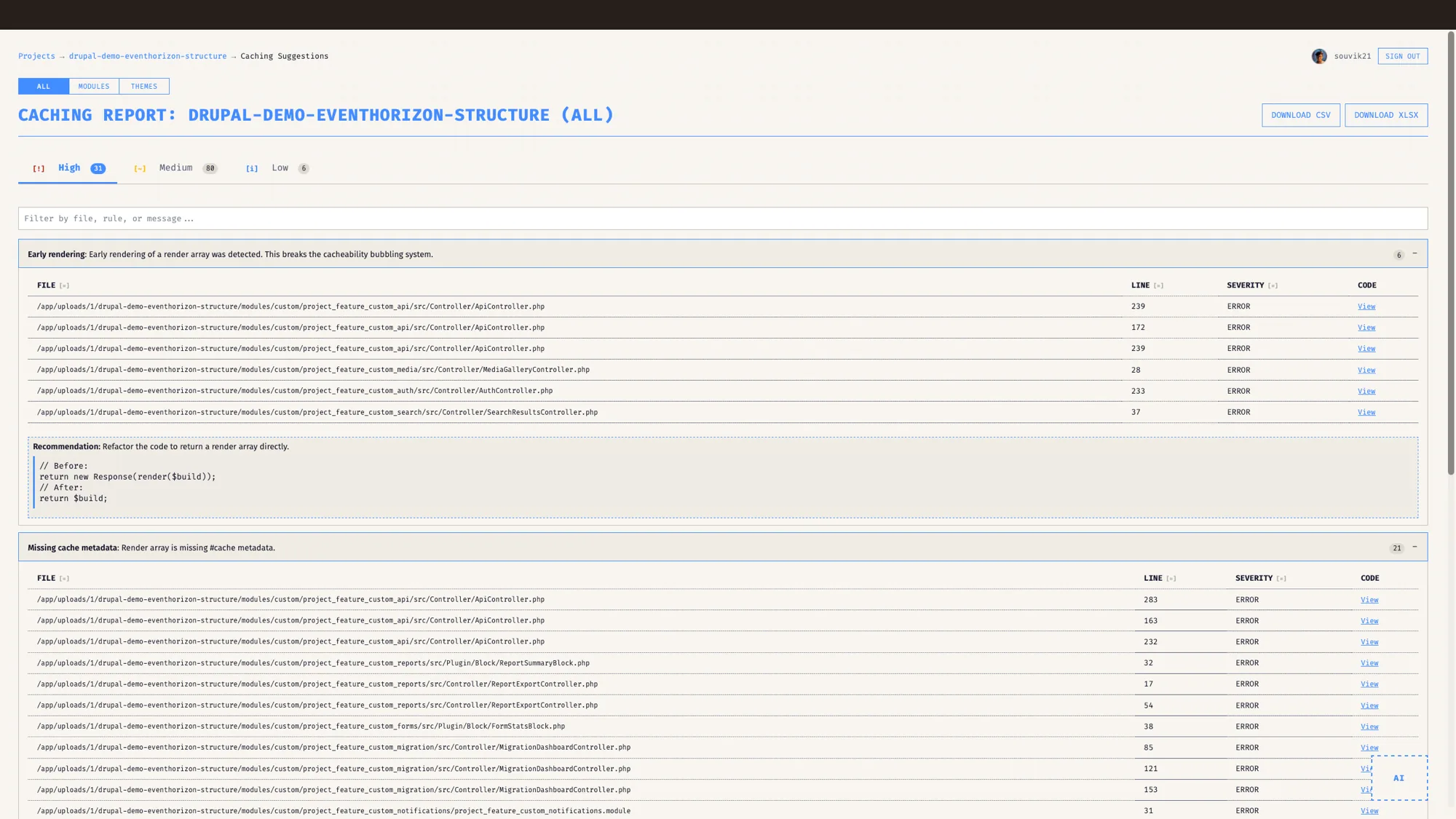
What does a real finding look like?
Take the block from the opening. It loads a list of recent articles, renders them, and returns the array. The query runs every time: there is no #cache on the output, and the content quietly depends on who is logged in.
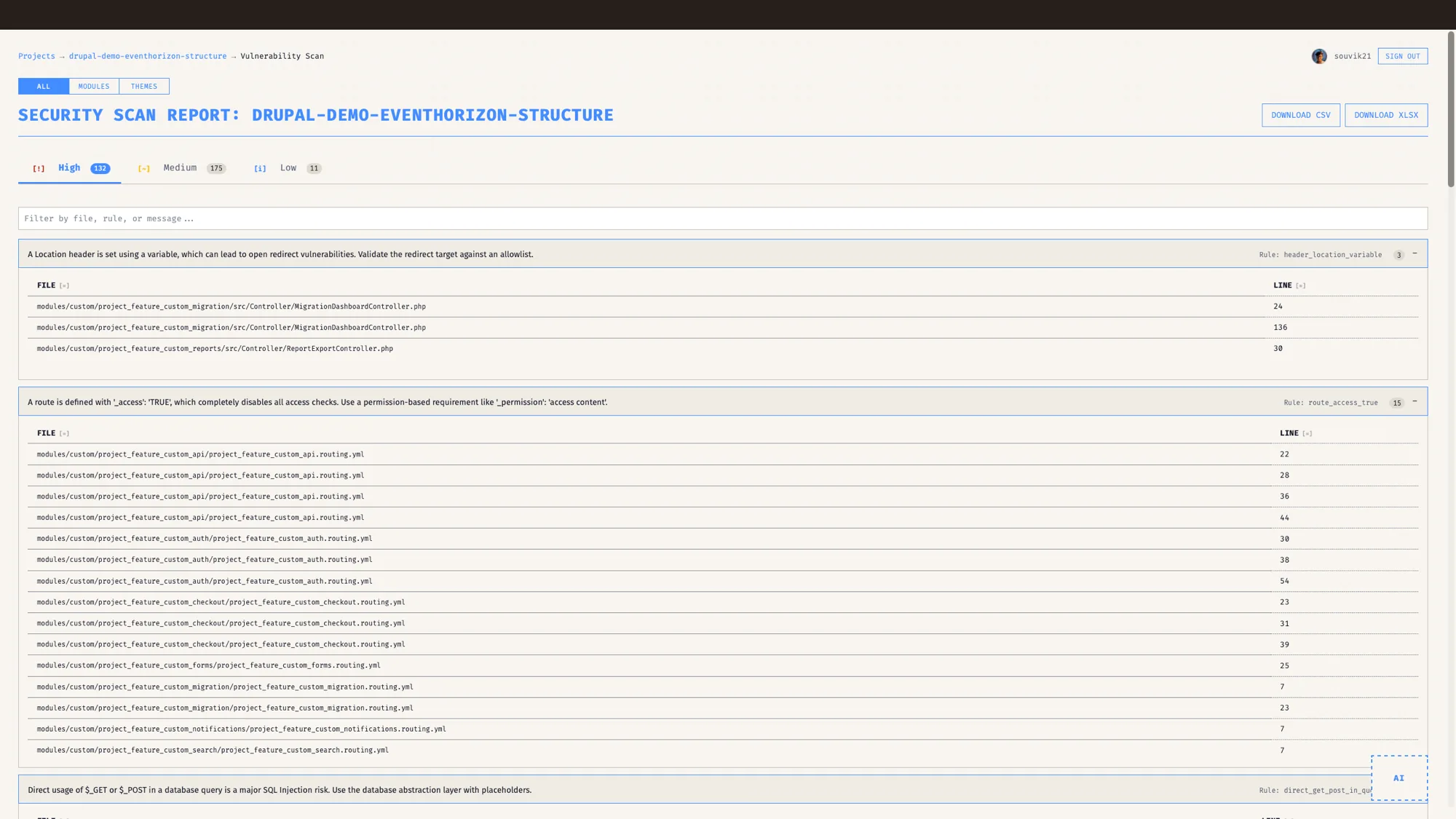
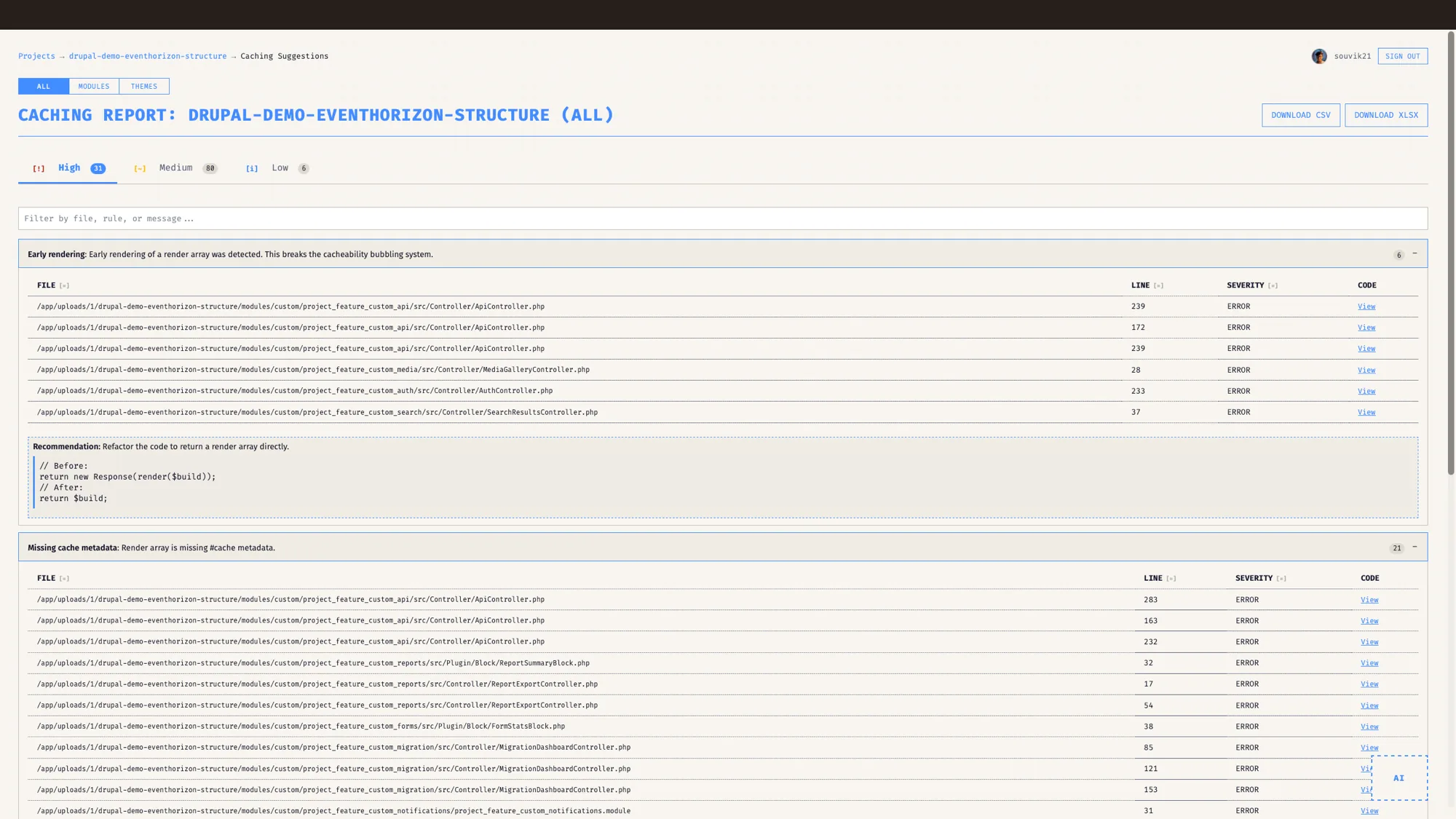
On a block like this, EventHorizon typically returns three findings. It flags the render array as rebuilt on every request and points at the line. It notes that the output depends on the user while the cache contexts never mention it, which is both a correctness risk and a performance one. And it picks up the uncached query sitting inside the build. For each, you get the severity, the file, the line number, and a recommended fix written as the Drupal code you would actually add.
That last part matters more than it sounds. The difference between "you should add caching here" and "add '#cache' => ['contexts' => ['url.path'], 'tags' => ['node_list']] on this line" is the difference between a ticket and a fix.
How does it turn all this into something a stakeholder reads?
Findings are useful to a developer. A score is useful to everyone else.
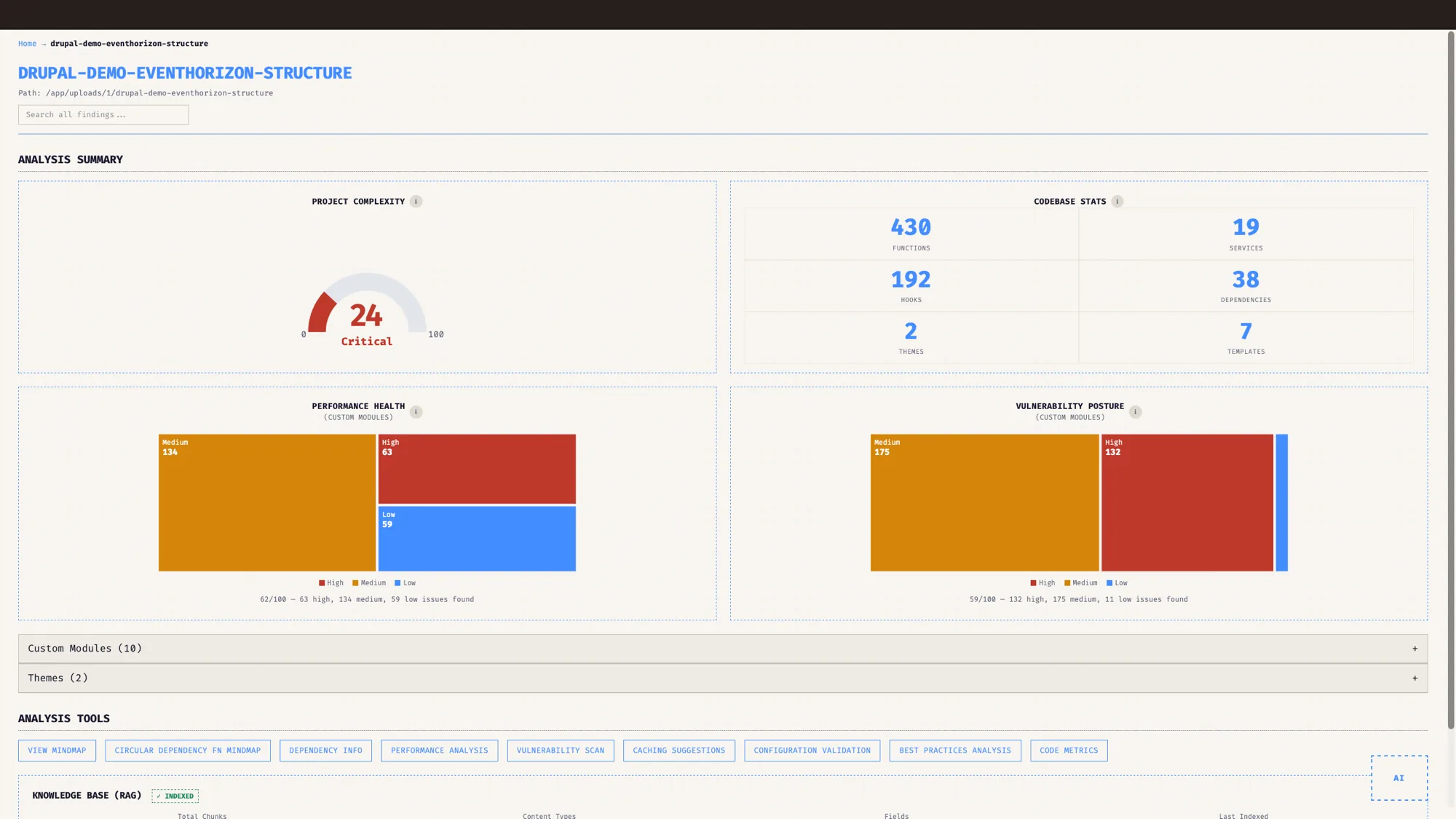
On the caching report itself, EventHorizon groups the findings into High, Medium and Low so you can read the shape of the problem at a glance. The caching work then feeds the broader Best Practices score, a 0 to 100 number where Performance is one weighted category sitting alongside security, architecture, maintainability and the rest. That overall score is a weighted average of how each category scores, so a clean caching pass lifts the Performance category, which lifts the whole picture. Personally, I treat a high score as healthy and a sliding one as a signal to stop and clean up before adding anything new. The number is there to make the trade-off visible and easy to act on.
It also draws the issues as a treemap, sized by module, so you can see at a glance whether your performance debt is spread evenly or concentrated in the one custom module nobody wants to open. That picture is the one I put in front of a client when I need to justify a performance sprint, because it makes the argument without a single line of code on screen.
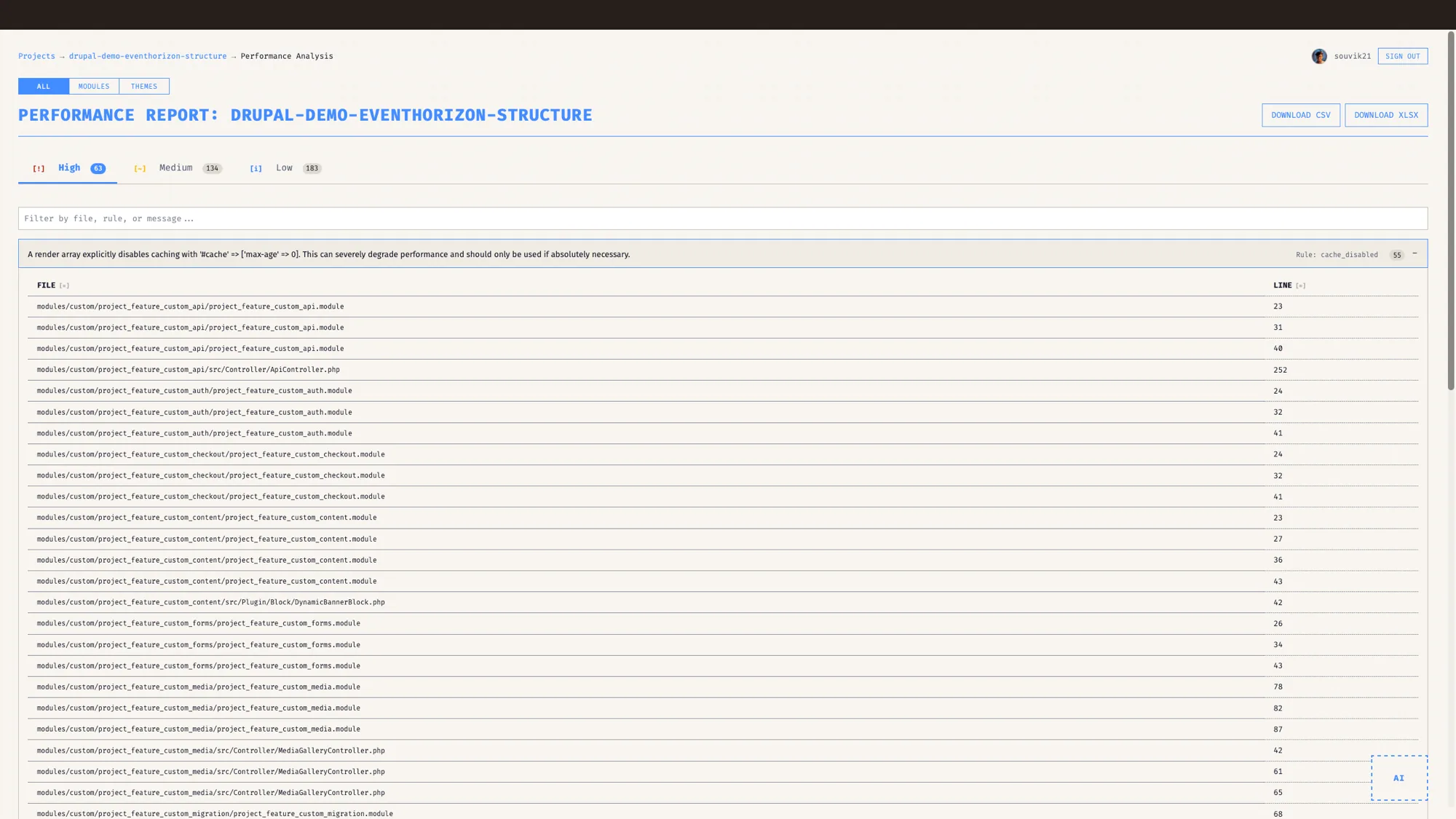
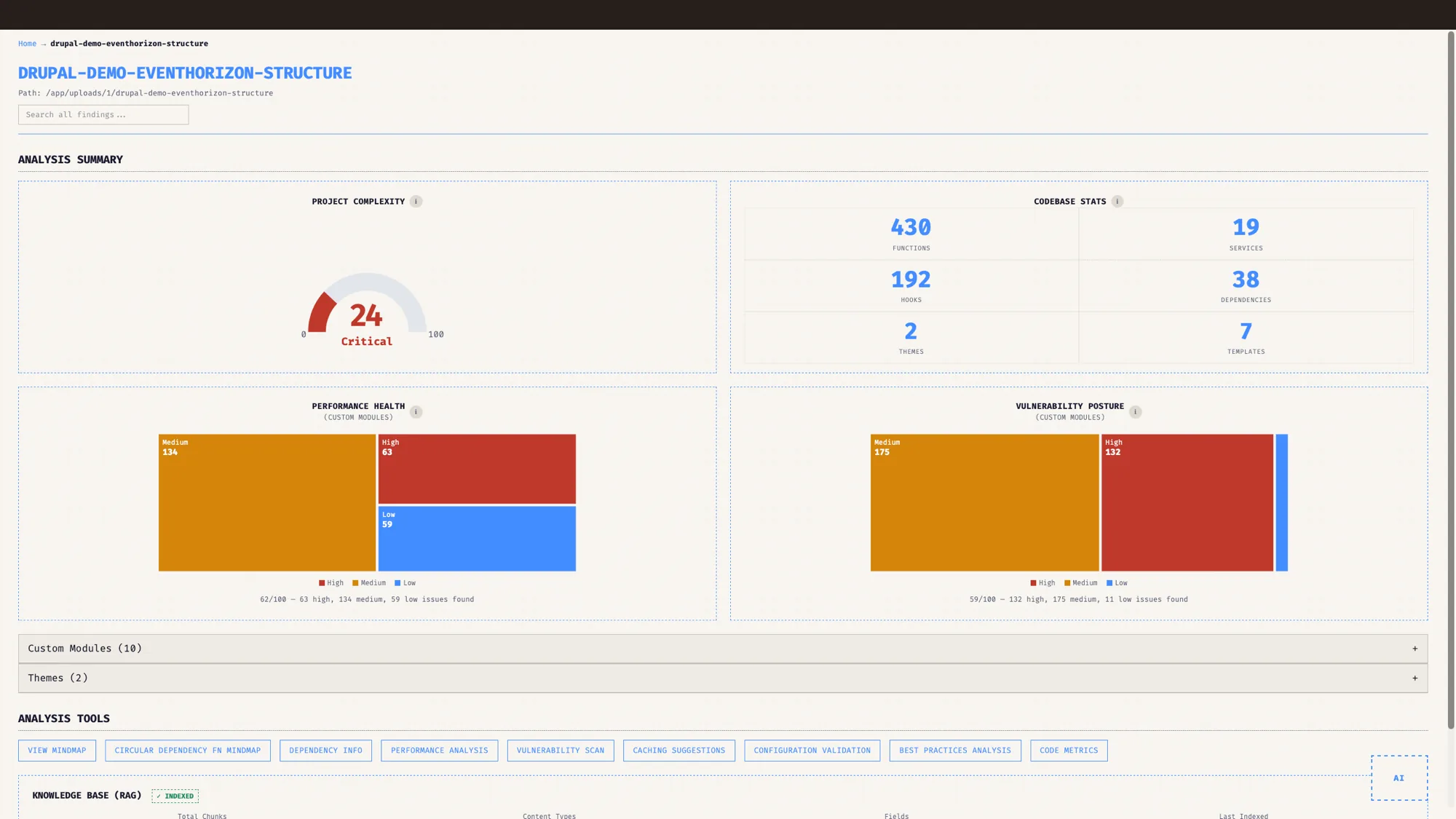
Custom code and contrib, the code you inherited too
One thing worth saying plainly. You can point the analysis at custom modules, at contrib, or at both, so a slow contrib module you inherited gets the same scrutiny as the code you wrote yourself. On an inherited project, that is often where the worst surprises are hiding.
Getting code in is its own small step. You connect a GitHub repository and choose which branch to scan, so you can audit the caching on a release branch while it is still in review and land it clean.
Who is this for?
If you run Drupal at any real scale, this is for you.
For agencies, it turns a performance audit that would take days of manual tracing into a report you can hand over the same morning you get access. For enterprises and product teams, it catches the caching mistakes that would otherwise surface as a slow Black Friday or a support ticket at the worst possible time. For the developer who has to fix it, it points at the line and hands over the patch.
Performance work on Drupal has always rewarded people who memorised the cache API. EventHorizon just writes that knowledge down and runs it for you.
Why I built the caching analysis
I did not build the caching analysis because caching is glamorous. I built it because the same class of bug kept eating days of my life, and every one of those days came down to a rule I knew perfectly well but could not check by eye across a hundred files.
This post is part of the EventHorizon release series. Start with the pillar, Drupal native, not generic, then read the companions on Drupal-aware security, dependency maps and upgrades, and keeping your code private.
Drupal performance usually comes down to something simple: a piece of output that wants caching and a rule that names how. EventHorizon makes that visible early, so you can see it first and fix it on your own schedule.
Frequently asked questions
What is a Drupal performance audit?
A Drupal performance audit checks the things that actually slow a Drupal site, which are usually caching mistakes. Slow algorithms are rarely the cause. EventHorizon runs sixteen Drupal-specific cache checks across render cache, cache tags, cache contexts and BigPipe, and reports the file, line and fix for each.
Does EventHorizon need to run on my Drupal server?
No. You connect a GitHub repository and pick the branch you want to scan, and EventHorizon analyses a copy of that code. There is nothing to install on the site you are auditing.
Does EventHorizon only check custom modules?
No. You can scan custom modules, contrib modules, or both. Inherited contrib code is often where the worst caching problems hide.
Will EventHorizon tell me how to fix a caching finding?
Yes. Each finding includes the file, the line, the reason, and a recommended fix expressed as Drupal cache API code you can paste in.
Which Drupal versions does EventHorizon support?
Drupal 8, 9, 10, and 11.
Does the performance analysis use AI?
No. The caching and performance analysis is static. AI chat is a separate, optional feature you can turn on per project with your own key.
See it on your own Drupal codebase.
EventHorizon is launching soon, exclusively through QED42. Join the waitlist for early access.