How I de-risk a Drupal 10 to 11 upgrade with a dependency graph
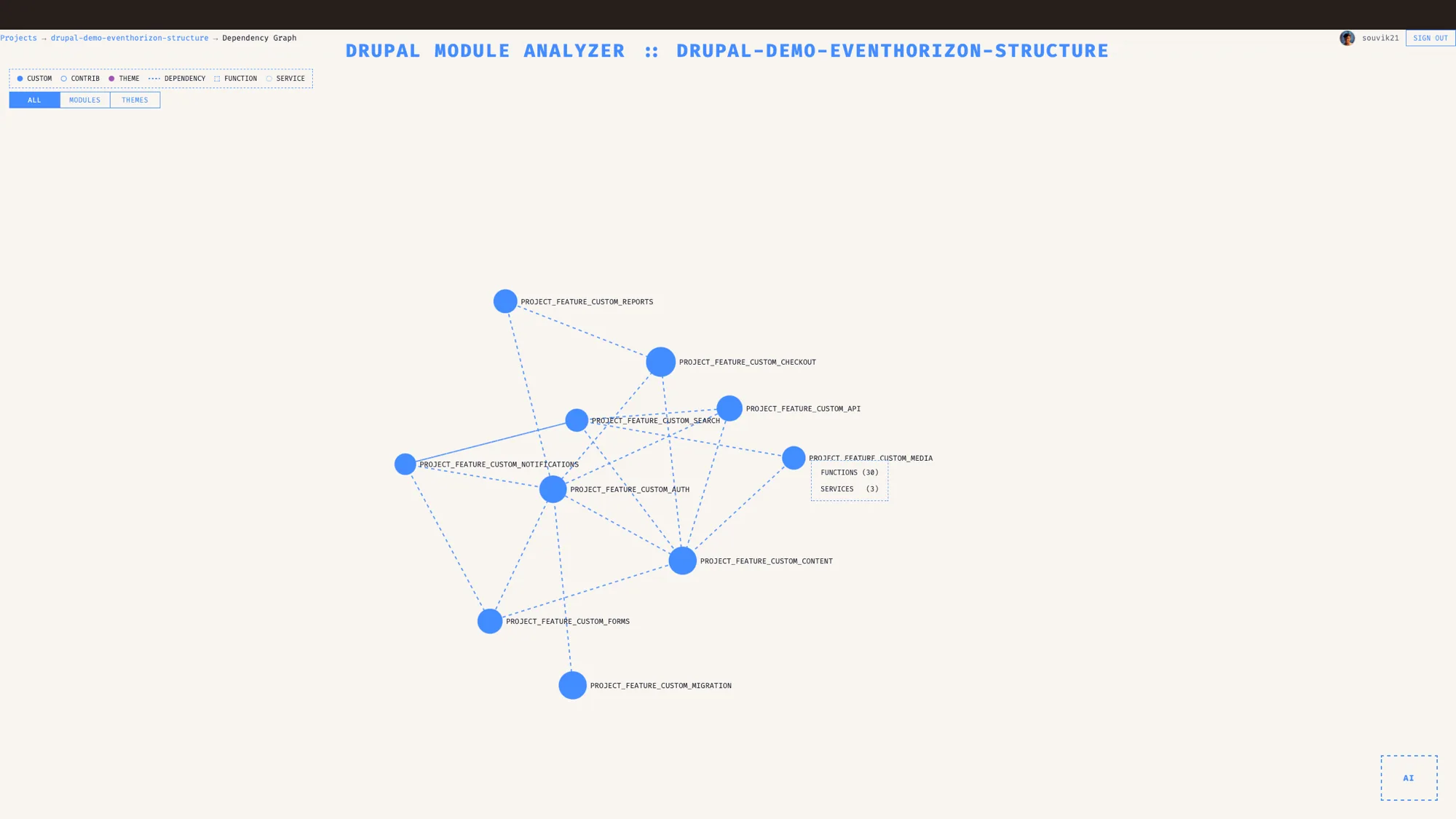
A Drupal dependency graph turns a large architecture into something you can see on one screen. EventHorizon draws every module, service and hook, finds the cycles, and shows what an upgrade will actually touch.
The short version
- A large Drupal architecture lives across many files, so the coupling that matters most for an upgrade is the part that is hardest to see at a glance.
- EventHorizon draws your codebase as a force-directed mindmap: modules, functions, and services, sized by how much code each module holds and colour coded by type.
- It detects circular dependencies and flags them by severity, so you know which cycle is a real refactoring target.
- For upgrades, it shows you what depends on what, so you can plan removing a module or moving a major version against what is genuinely connected. Config validation catches broken references and orphaned structures too.
- Built for Drupal 8 to 11.
There is a particular kind of meeting that every Drupal architect has lived through. Someone proposes removing a module, or bumping a major version, and the room goes quiet. Not because it is a bad idea, but because nobody can say with confidence what will break. The person who knew left eighteen months ago. The documentation, if it exists, describes a system that has since changed three times. So you make the change, you cross your fingers, and you find out in staging what was actually connected to what.
I have made that change and watched it break things I did not know were related. The problem was never my judgement. The problem was that I could not see the shape of the system I was changing.
So this is a post about seeing that shape before you touch it.
Why is a large Drupal architecture so hard to hold in your head?
Because the connections that matter are spread across the whole codebase and never appear in one place.
A module declares some dependencies in its info file, but the real coupling is deeper. One module's hook reaches into another's data. A service is injected here and reused there. A function in one module calls a function in another, across a boundary that no diagram records. Add a content model on top, with paragraph types and fields referencing each other, and the true architecture becomes an emergent thing that lives in the relationships between files, spread across the whole codebase.
Human memory carries a lot of this today, and it does honest work. It also leaves with people, goes stale quietly, and tends to thin out in exactly the cases that matter most: the rare connection you forgot, the cycle you did not know existed. A drawn map gives that knowledge a place to live that stays put.
What the dependency mindmap shows you
The mindmap is the feature that makes an architecture discussion concrete and productive.
It draws your codebase as a force-directed graph. Each node is a module, sized by how much code it holds: the more functions and services a module has, the bigger its node. Each edge is a real dependency, styled by the kind of connection it is. Colour tells you type at a glance: custom modules are filled blue, contrib modules a hollow blue ring, core and other modules a dashed blue outline, and themes purple. So the parts you own and the parts you inherited separate visually without you doing anything.
It gives you three ways to look:
- Module view, to see how modules interconnect and find the highly coupled ones that everyone is quietly afraid to touch.
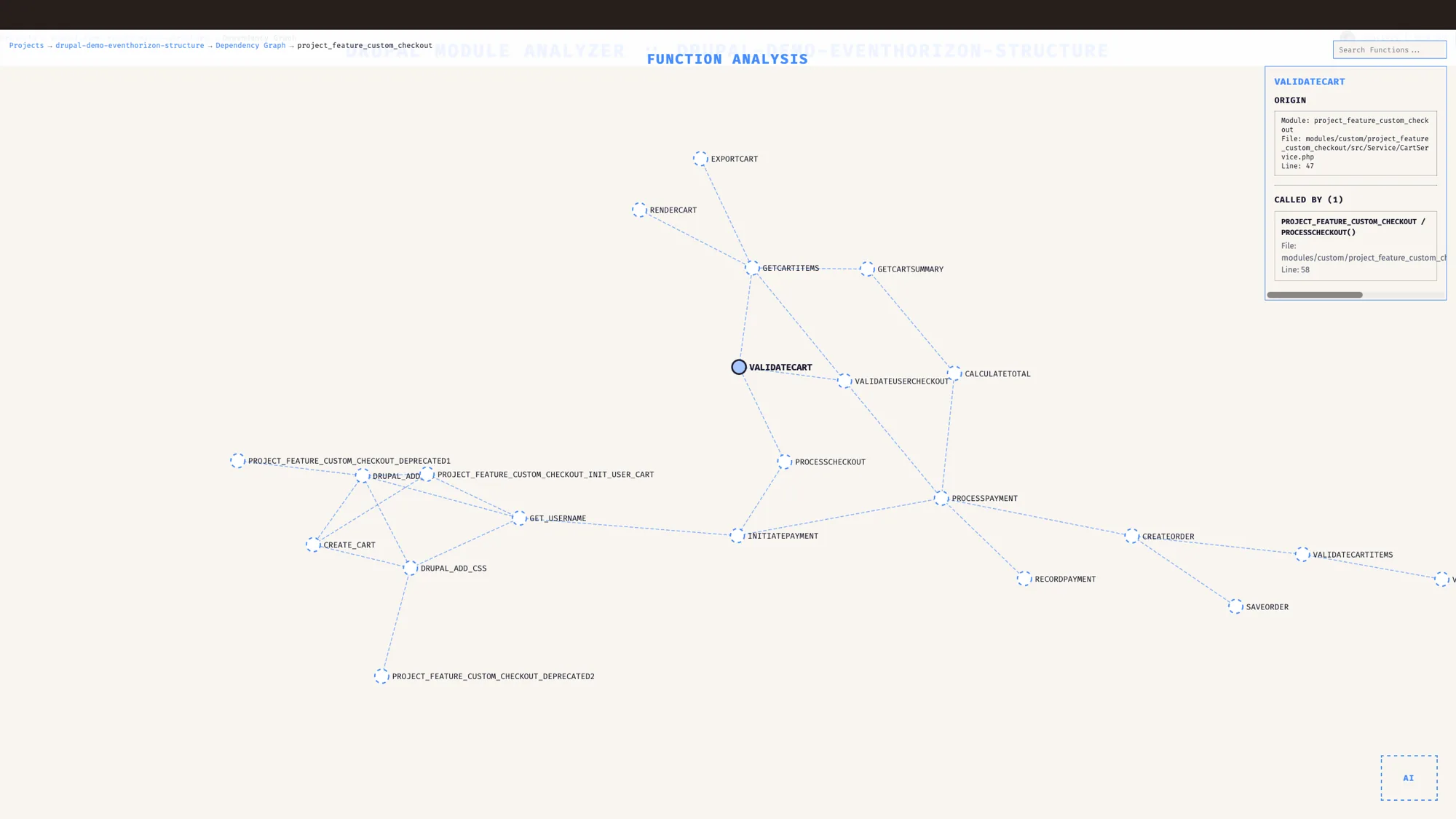
- Function view, to drop down to which functions call which across module boundaries.
- Service view, to see how dependency injection actually wires your services together.
You can search for a module or function, zoom and pan, drag nodes around to untangle them, filter by type, and click any node to read its metadata. The graph is built on real dependency analysis underneath, so it shows the system as it actually is, including the parts someone only hoped were true.
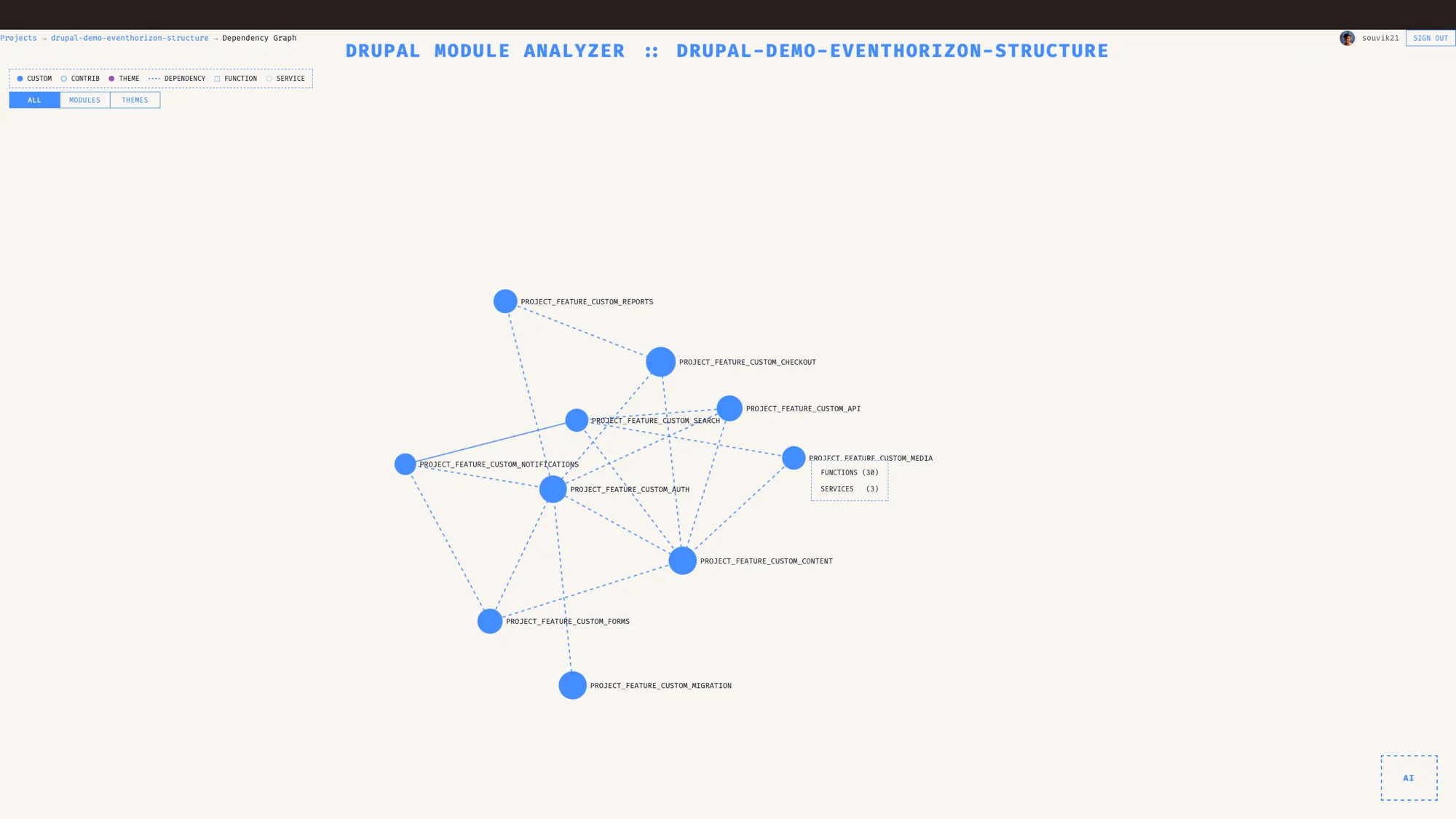
I have lost count of how many times sharing this on a screen has replaced twenty minutes of me describing an architecture badly. People stop arguing about what the system looks like and start looking at it.
Circular dependencies, surfaced early
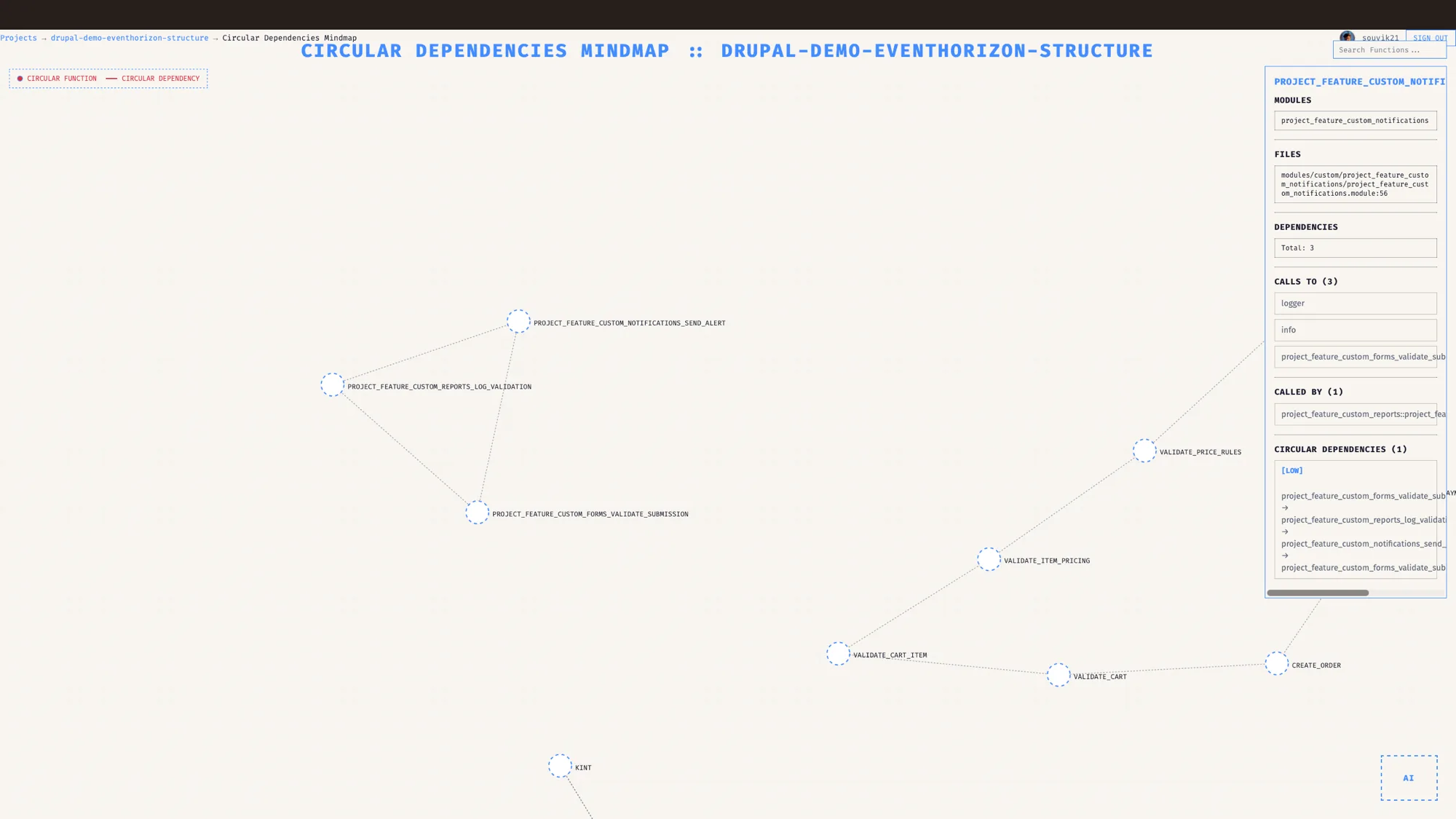
When module A depends on B, B depends on C, and C depends back on A, you have a cycle. Cycles make testing and refactoring harder, because there is no clean end to pull on. They also tend to hide when you read code, since each individual link looks perfectly reasonable on its own. Seeing them drawn out helps a lot.
EventHorizon detects these cycles automatically and flags each one by severity: high, medium, or low, so you know which is a real refactoring target. A dedicated circular view draws only the functions caught in a cycle, every one of them in red, with the loop drawn as the loop it is. It groups those functions by their parent module, so you can see straight away whether a tangle lives inside one module or spans several, which is the worse and more urgent case.
De-risking an upgrade
This is where the mindmap stops being interesting and starts being useful.
Before you remove a contrib module or commit to a major version move, the question is always the same. What depends on this? With the graph in front of you, you can answer it by looking. You see the blast radius, the things wired to the part you want to change, and plan the work around what is actually connected.
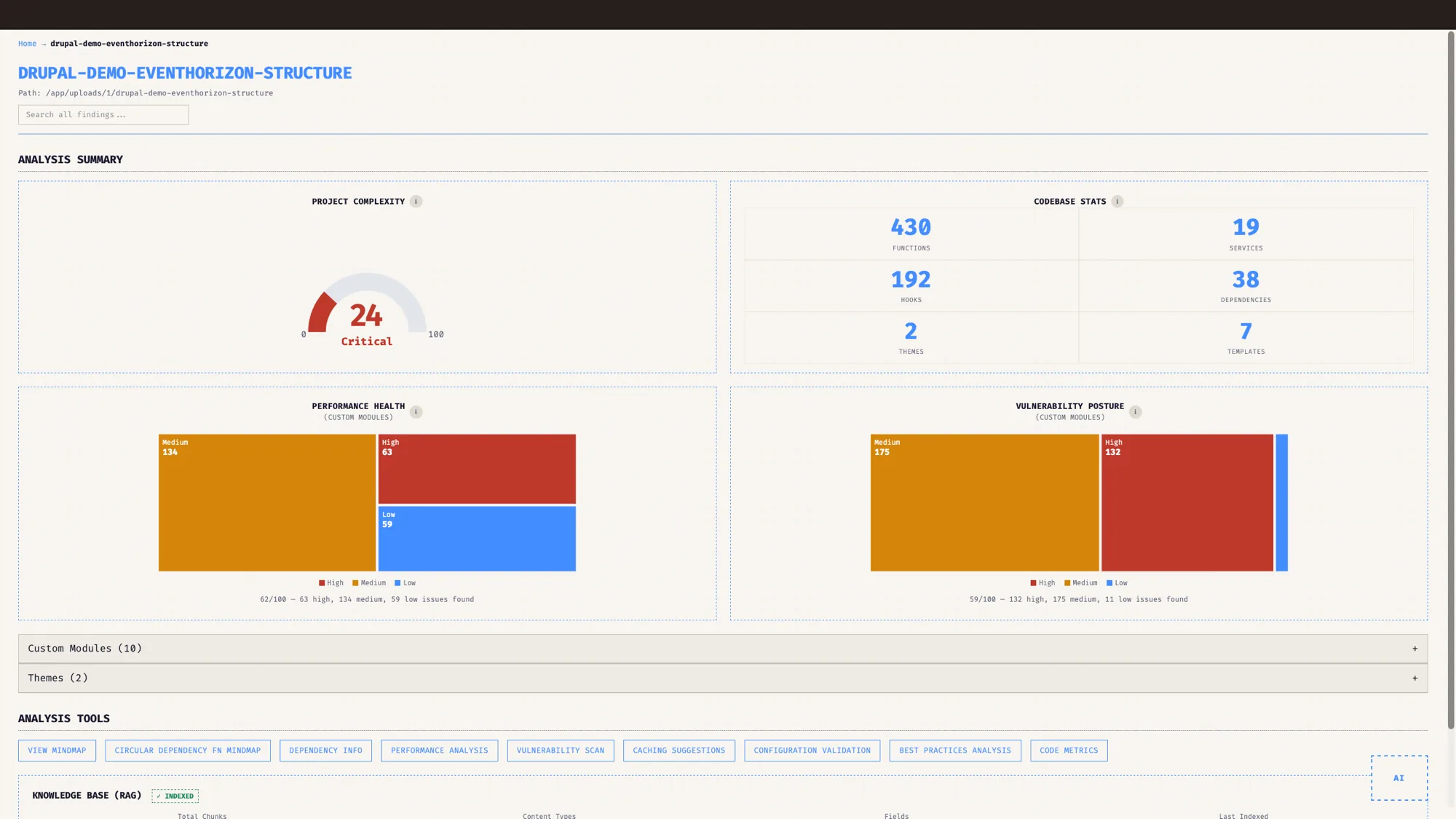
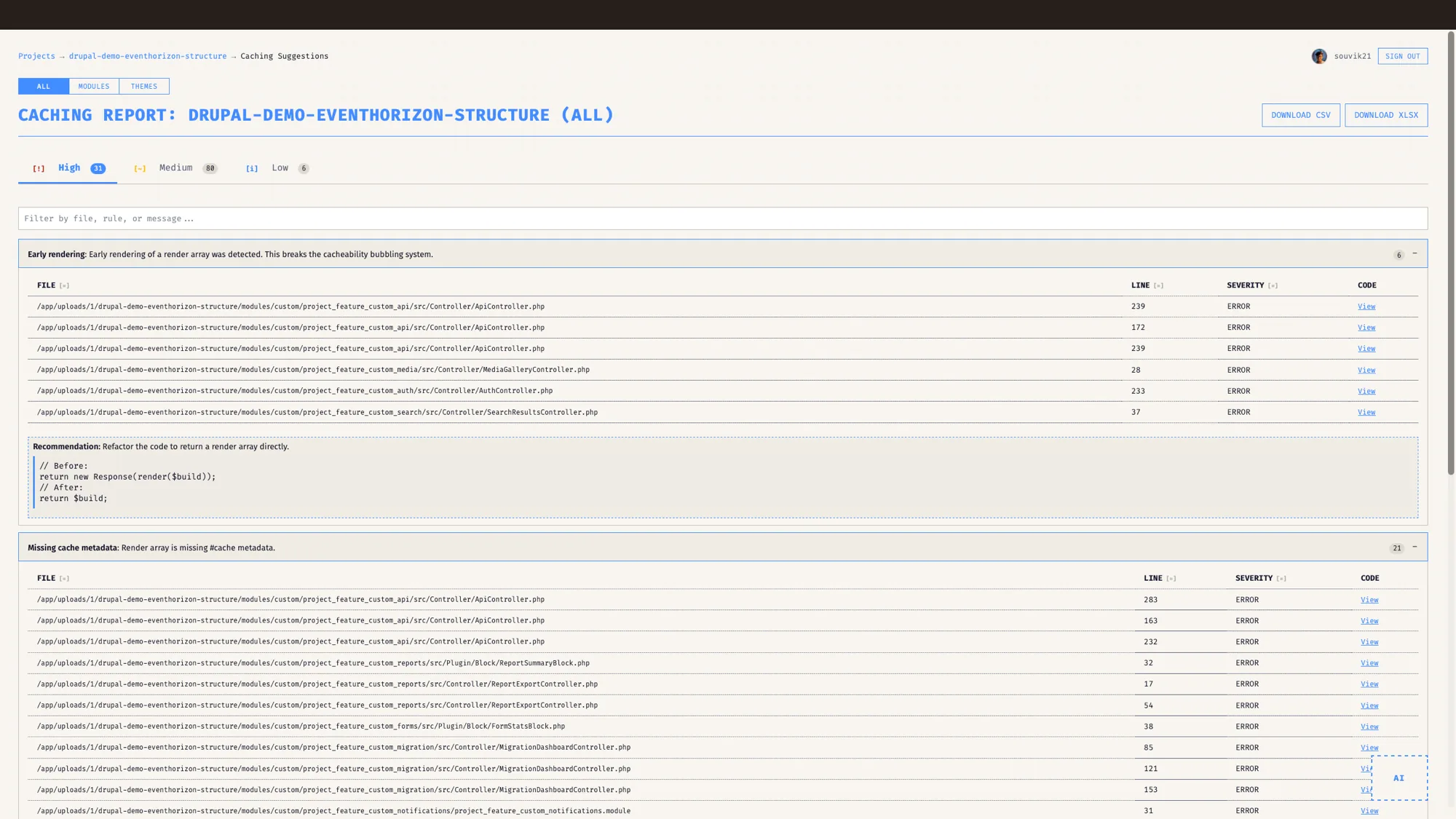
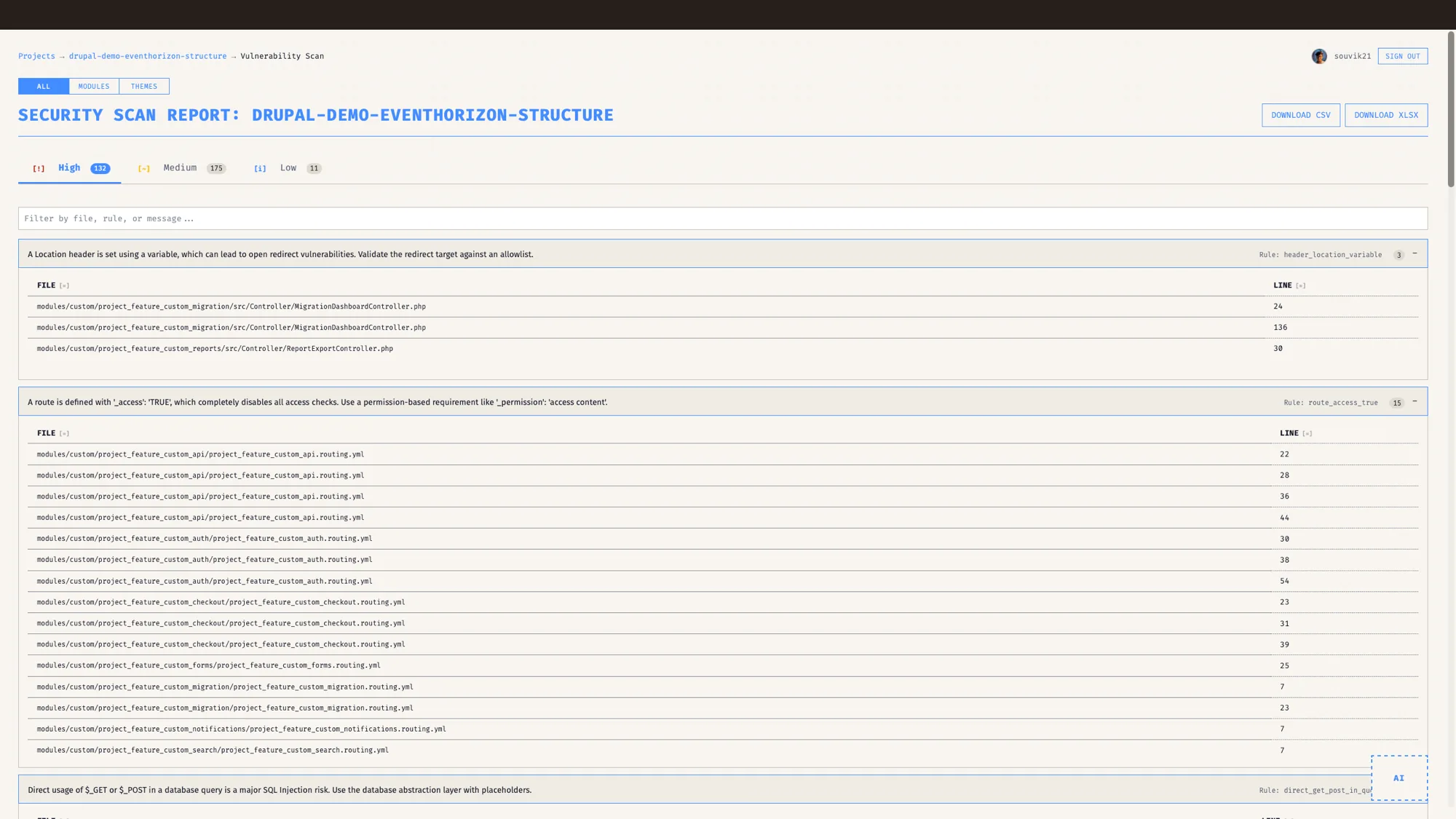
Beyond the graph, EventHorizon now reads the code itself for what breaks on Drupal 10 and 11. It flags removed core functions like drupal_set_message, db_query and the REQUEST_TIME constant, info files that still pin ^8 or ^9 or omit a core version requirement, jQuery .once() that should move to the @drupal/once library, and Twig {% spaceless %} that needs {% apply spaceless %}. These land in the performance audit, so the upgrade backlog reads as a concrete list of files and lines you can work straight through. Removed APIs come through as errors because they will not run on the current release; the version constraints and the jQuery and Twig changes come through as warnings.
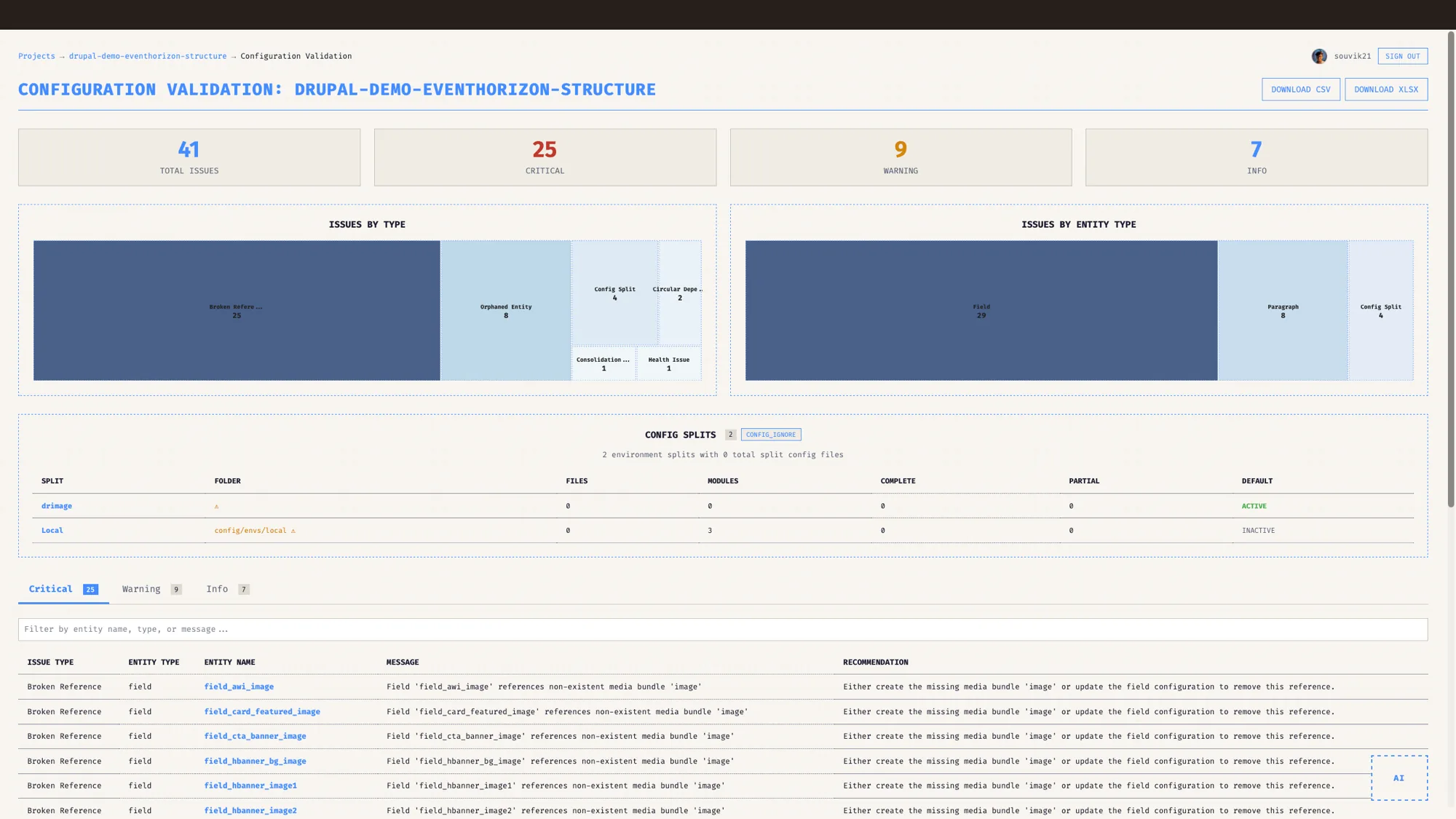
Configuration gets the same treatment. If your project ships a config sync directory, EventHorizon validates it and surfaces the problems that quietly break an upgrade: fields pointing at content types that no longer exist, paragraph types defined but never used, and paragraph types that reference each other in a loop. That is content model cleanup you would otherwise do by hand, one YAML file at a time. The config view also explains your config splits in plain language, so an inheritor can read it cold: what a split is, what 0 split config files means, the difference between an active and an inactive split, and when the folder for a split is missing on disk.
What does a real session look like?
Say you want to retire a custom module you suspect is dead weight. You open the mindmap, search for it, and click. The graph lights up everything connected to it. Maybe it is genuinely isolated and the removal is safe. Maybe a dozen things lean on it in ways the info file never mentioned, including a hook another team relies on. Either way you now know before you write a line, and the estimate you give is based on the system as it is.
That single shift, from guessing to seeing, is most of the value. The rest is that everyone else in the room can see it too.
Who is this for?
For architects, it replaces hand-waving with a shared picture the whole team can read. For agencies inheriting a project, it turns the first terrifying week into a guided tour, so you can scope and estimate against the real architecture. For enterprises planning a major version move, it turns the upgrade from a leap of faith into a plan that accounts for what is actually wired together.
If your business depends on a Drupal codebase that has outgrown anyone's full understanding, this is the tool that gives you the whole picture back.
What a dependency graph adds to an architecture diagram
Architecture diagrams are great for sharing intent. They show what you mean the system to look like, and they read cleanly in a deck. A dependency graph adds a second view drawn from the code as it runs today, including the parts you forgot and the parts that left with the last engineer who knew them. The two work well side by side.
This post is part of the EventHorizon release series, alongside the pillar, Drupal native, not generic, and the companions on performance and cache tags, Drupal-aware security, and keeping your code private.
EventHorizon helps you get to the clear view that every hard architectural decision tends to come down to. It draws the map; the refactoring call stays yours.
Frequently asked questions
What is a Drupal dependency graph?
A Drupal dependency graph maps the real relationships between modules, functions and services so you can see how a codebase is connected. EventHorizon draws it as an interactive force-directed map, detects circular dependencies, and shows what a major upgrade will touch.
How does EventHorizon build the dependency graph?
It analyses the codebase and maps real dependencies between modules, functions, and services, then draws them as an interactive force-directed graph you can explore.
Can EventHorizon find circular dependencies?
Yes. It detects dependency cycles automatically and flags them by severity, grouping the members by their parent module so you can see how far the tangle spreads.
How does EventHorizon help with a Drupal upgrade?
By showing you what depends on what, so you plan removing a module or moving a major version against what is genuinely connected. It also validates configuration for broken references and orphaned structures.
Does the dependency analysis work on contrib modules too?
Yes. The graph and analysis cover custom and contrib code, which matters most on inherited projects.
Which Drupal versions does the dependency analysis support?
Drupal 8, 9, 10, and 11. It also reads the code for what breaks on 10 and 11, flagging removed core APIs and legacy version constraints, so support here means it helps you see what to update as you move forward.
See it on your own Drupal codebase.
EventHorizon is launching soon, exclusively through QED42. Join the waitlist for early access.